2009년 6월 9일 화요일

NFSW Pro - racing wheel is comming!

Need for Steering Wheel Pro (NFSW Pro) is now submitted to app store. You can play almost any racing games with NFSW Pro. It has configurable key assignment feature so that you can change key assignment of NFSW Pro according to key configuration of your favorite racing games.

And more, It saves your configuration. You will not have to configure your wheel settings every time when you launch NFSW Pro. It automatically restores your setting when it starts.

Yes. cool sounds are added. It will feed you back when you touch NFSW Pro buttons. Graphics are highly enhanced too.


2009년 5월 22일 금요일

2009년 5월 17일 일요일

WoW Fishing 1.1 released !

It is minor patch for WoW Fishing version 1.0.

- Some instructional picutres included
- Bug fix related to vibration feedback

Download WoW Fishing 1.1


2009년 5월 15일 금요일

Need for Steering Wheel


Now iPhone turns into racing wheel!

Are you master of NFS with keyboard? Want more challenge? Want steering handle, not keyboard? NFSW is here! You can drive your car using iPhone/iPod touch. It is iMocon technology based, so if you have wifi access point for iPhone and wired connection for your PC, you can play nfs like using keyboard, with more exciting way.

How to play:
1. Download free motrix universal server (for pc and mac) at http://pangpanggames.blogspot.com
2. Unzip downloaded file at somewhere on your computer.
3. Start unzipped program.
4. Type in port number between 1024 and 65535. default value is 1234.
5. Press start.
6. Start NFSW and type the same number you type in the motrix universal server.
7. Press find.
8. Touch one of address of available servers you want to connect.
9. Connection established. Now you can play NFS with NFSW!


NFSW will be available soon at the AppStore.


See Youtube movie


2009년 5월 5일 화요일

Motrix Universal Server for mac os 1.02 released


What's new in this version :

Double click fix for mac os version.
(windows xp version don't need this fix.)

download link

Motrix Universal Server for mac os 1.02
Motrix Universal Server for windows xp 1.01


.

2009년 4월 30일 목요일

iMocon - remote control your pc with iPhone

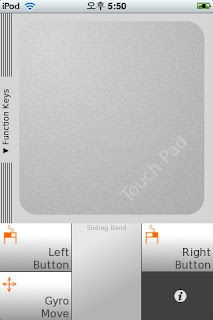
iMocon turns your iPhone/iPod Touch into remote controller for your mac/pc. Use iMocon as function keys, multimedia control, touch pad, and air mouse.

It requires server program called Motrix Universal Server(MUS), which is available for download at no cost.

universal server requirements:

windows xp service pack2
or
mac os leopard 10.5.5 or above

buy iMocon Here

instructions:

1. Run universal server on your desktop computer. If you don't have already downloaded universal server yet,
go to http://pangpanggames.blogspot.com and download the universal server.
2. Port number of the server and iMocon should be identical.And, the Universal server and iMocon should be in the same network segment.
3. Touch and move your finger on the area named 'touchpad' to move mouse pointer.
4. Touch left button and right button to emulate mouse click.
5. Touch and move your finger on the area named 'sliding band' to scroll document or page under the mouse cursor.
6. Touch 'gyro move' to move mouse cursor using your hand motion(need some practice).
7. You can 'gyro move' while pressing left button to drag window or some objects.
8. Slide off touchpad by touch and move your finger on the area named 'function keys' to use function keys.
9. Touch any function keys you desire.
10. Touch green 'change layout' button to get another function key set. It will be cycled.


.

welcome to

팔로어